Instagram post sizes for 2026
The sizes to export, and what the 3:4 grid does to each one.
| Format | Shape | Export size | Grid cuts |
|---|---|---|---|
| Portrait, tallest | 3:4 | 1080 × 1440 | Nothing |
| Portrait | 4:5 | 1080 × 1350 | 6% of the sides |
| Square | 1:1 | 1080 × 1080 | 25% of the sides |
| Landscape | 3:2 | 1080 × 720 | 50% of the sides |
| Landscape, widest | 1.91:1 | 1080 × 566 | 61% of the sides |
| Reels | 9:16 | 1080 × 1920 | 25% of the height |
| Stories | 9:16 | 1080 × 1920 | Not on the grid |
Sizes last checked October 2026. Instagram doesn't publish one master list, and it changes shapes without much notice, so check a new format in the app before relying on it.
Not sure about a photo? The free crop checker shows exactly what gets cut.
Which shape should photographers use?
Use 3:4 when you want the post and the grid tile to match. Use 4:5 if your edits already sit at that shape: the grid only trims a little from each side. For a landscape, either accept the grid crop and choose what stays, or put it on a white border so the whole frame shows.
Carousels
A carousel holds up to 20 slides, and they all take the shape of the first. Only the first slide shows on your grid. To run one wide photo across slides, see how to post a panorama carousel.
See each shape before you post
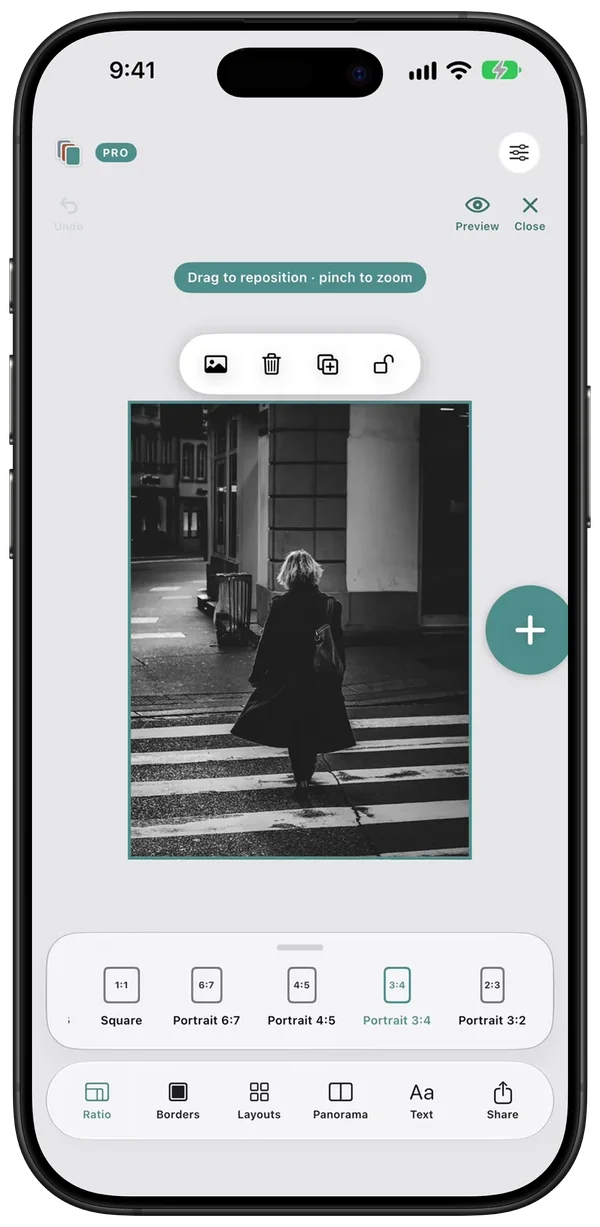
In Swatch, Ratio tries a photo at each Instagram shape while you edit, and Preview shows every post and slide the way it lands in the feed.
Questions
What is the best size for an Instagram post?
For most photographers, 1080 × 1350 (4:5) or 1080 × 1440 (3:4). Both fill more of the feed than a square, and 3:4 matches the grid tile exactly.
Is the Instagram grid 3:4 or 4:5?
The profile grid shows posts as 3:4 tiles. A 4:5 post loses about 6% from its sides there. Open the post and it shows at its full shape.
How many photos can a carousel have?
Up to 20. They all take the shape of the first slide.
What size is a Reel cover on the grid?
Reels are 1080 × 1920 (9:16). On the grid they show as a 3:4 tile, so keep the subject of the cover near the centre.
Do these sizes change?
Yes, Instagram changes them without much notice. This page was last checked in October 2026.
Plan the next nine in Swatch.
Free to download on iPhone. One payment unlocks Swatch Pro for good, with no subscription.
Download on the App Store →